Flexible grouping of luminaires with Thinq
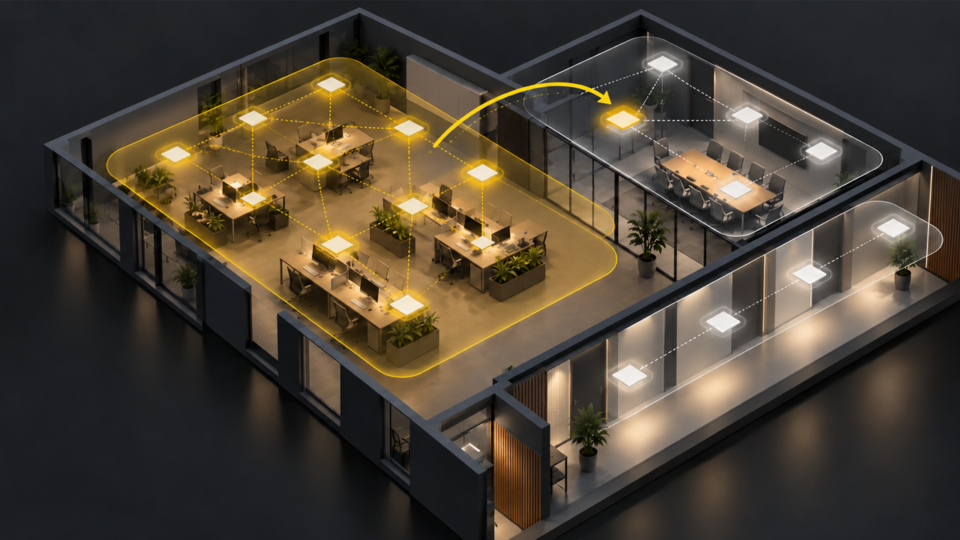
With Thinq Grouping, you can wirelessly organize luminaires by room, zone, or function. You manage the group layout via the Thinq app, eliminating the need for adjustments to physical cabling. Each group receives its own settings for presence detection, daylight-dependent light control, dimming levels, and scenes. This ensures the lighting aligns with the use of every space or zone.
What is Grouping?
Grouping is a Thinq feature that allows you to combine individually addressable luminaires into functional groups, such as a meeting room, work zone, corridor, or classroom. The group layout is independent of physical cabling, allowing you to adjust the configuration whenever the use or layout of a building changes.
How does Grouping work?
Each Thinq luminaire remains individually addressable. You assign luminaires to a group via the Thinq app and then set the desired light control per group. You can manage settings for presence detection, daylight-dependent light control, dimming levels, light scenes, and scheduled switching moments with Scheduling.
If the building layout changes, you can simply move the relevant luminaires to a different group via the app. The physical cabling does not need to be adjusted for this.
What are the benefits of grouping luminaires?
Thinq Grouping makes a lighting installation flexible and scalable. The main benefits are:
- Creating groups without adjusting the physical cabling.
- Managing settings per room, zone, or function.
- Adjusting the group layout when the use of a building changes.
- Starting with a few rooms and later scaling up to an entire building.
- Managing luminaires and groups wirelessly via the Thinq app.
- Targeted setting of presence detection, light levels, and scenes per group.
With traditional hard-wired group layouts, changes to the installation may be required. With THINQ Grouping, you adjust the functional layout via the app.
Managing multiple groups with labels
Labels allow you to connect groups that share the same function, such as all corridors, offices, or meeting rooms within a building. Settings for groups with the same label can be managed centrally, so you do not have to perform a change separately for every group.
The settings available via labels depend on the chosen configuration and the available Thinq functionalities.
Application
Grouping is suitable for buildings where spaces are regularly rearranged or used differently.
- Offices
Divide an open office floor into separate work zones, meeting areas, and traffic routes. Each zone can have its own light control.
- Schools
Group luminaires per classroom, study zone, corridor, or common area. The group layout can be adjusted when classrooms are used differently.
- Healthcare institutions
Create separate groups for corridors, living areas, treatment rooms, and support rooms, ensuring each space receives an appropriate setting.
- Dynamic buildings
Use Grouping in buildings where the layout changes regularly, such as multifunctional spaces, flexible workspaces, and rooms with varying functions.
Practical example: dividing an office into work zones
A large office space is split into multiple work zones. The existing luminaires remain in the same place and connected to the same installation.
Via the Thinq app, you assign the luminaires to the new groups. Each work zone then receives its own light control settings. No new group cabling is required. If the office layout changes again later, the luminaires can be moved to other groups via the app.
Bekijk hoe Grouping werkt